> ## Documentation Index
> Fetch the complete documentation index at: https://docs.sovara-labs.com/llms.txt
> Use this file to discover all available pages before exploring further.
# Python SDK quickstart
> Set up the Sovara Python SDK and record a project-bound agent run.
Sovara records supported LLM, MCP, and explicitly traced tool calls inside an
SDK run. Every Python integration starts with one project-bound
`SovaraClient`.
## Install
Follow [Installation](/get-started/installation) to use an existing Sovara
environment or choose a local, remote, or headless setup. Then add the packages
used by this example:
```bash theme={"theme":{"light":"github-light","dark":"github-dark"}}
uv add sovara openai-agents
```
Set `OPENAI_API_KEY` in the environment before running the example.
## A complete example
This example uses two child agents to compare the weather in Zurich and
Boston. Their model and framework tool calls are recorded automatically;
`trace` records the custom comparison step.
```python theme={"theme":{"light":"github-light","dark":"github-dark"}}
from agents import Agent, Runner, function_tool
from sovara import SovaraClient, trace # [!code ++]
sovara_client = SovaraClient(project_name="weather-agent") # [!code ++]
@function_tool
def get_zurich_temperature() -> int:
"""Get the current temperature in Zurich in Celsius."""
return 22
@function_tool
def get_boston_temperature() -> int:
"""Get the current temperature in Boston in Celsius."""
return 27
zurich_agent = Agent(
name="Zurich weather agent",
instructions="Call the weather tool and return only the temperature.",
model="gpt-5.4-mini",
tools=[get_zurich_temperature],
output_type=int,
)
boston_agent = Agent(
name="Boston weather agent",
instructions="Call the weather tool and return only the temperature.",
model="gpt-5.4-mini",
tools=[get_boston_temperature],
output_type=int,
)
@trace(name="choose warmer city") # [!code ++]
def choose_warmer_city(zurich: int, boston: int) -> str:
if zurich == boston:
return f"Boston and Zurich are equally warm at {zurich} C."
city = "Zurich" if zurich > boston else "Boston"
return f"{city} is warmer ({boston} C in Boston, {zurich} C in Zurich)."
def main() -> None:
question = "Which city is warmer, Boston or Zurich?"
with sovara_client.run("compare city weather"): # [!code ++]
# Attach the user-visible request to the top-level run. # [!code ++]
sovara_client.log_input(question) # [!code ++]
# Each subrun groups one delegated agent's work into an expandable child run. # [!code ++]
with sovara_client.subrun("Zurich weather agent"): # [!code ++]
zurich = Runner.run_sync(zurich_agent, question).final_output
with sovara_client.subrun("Boston weather agent"): # [!code ++]
boston = Runner.run_sync(boston_agent, question).final_output
answer = choose_warmer_city(zurich, boston)
# Attach the final user-visible result to the top-level run. # [!code ++]
sovara_client.log_output(answer) # [!code ++]
print(answer)
if __name__ == "__main__":
main()
```
Sovara records supported framework tools such as `@function_tool` and MCP
calls automatically. Do not add `@trace` to those tools as well; reserve it
for important operations that are not already captured.
Subruns are optional, but provide a useful abstraction for grouping child
agents or delegated phases into expandable units.
## Verify one run
Save the example as `weather_agent.py`, then run it normally:
```bash theme={"theme":{"light":"github-light","dark":"github-dark"}}
uv run python weather_agent.py
```
Open the `weather-agent` project in Sovara to inspect the run. A run typically
corresponds to one chat session or one workflow execution.
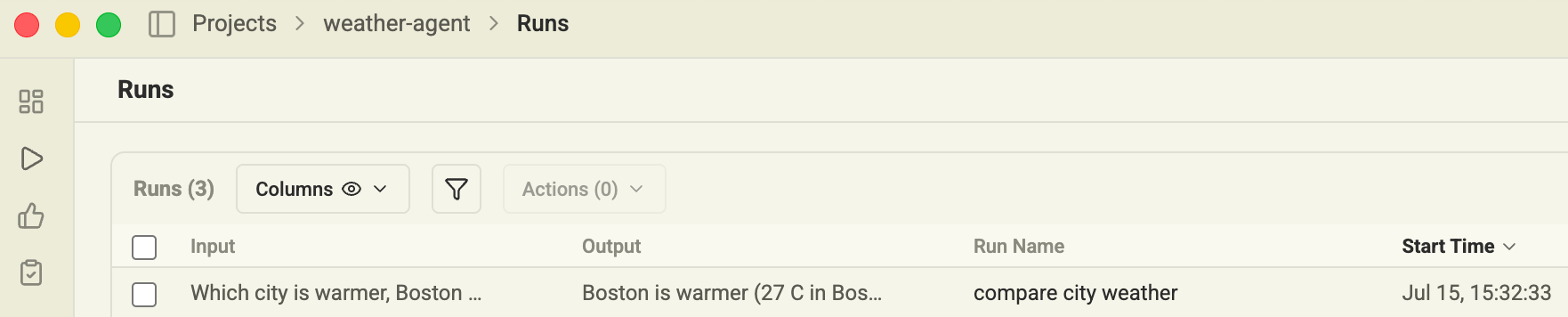
`log_input()` and `log_output()` populate the Input and Output columns in the
Runs table, so you can scan results without opening each run:
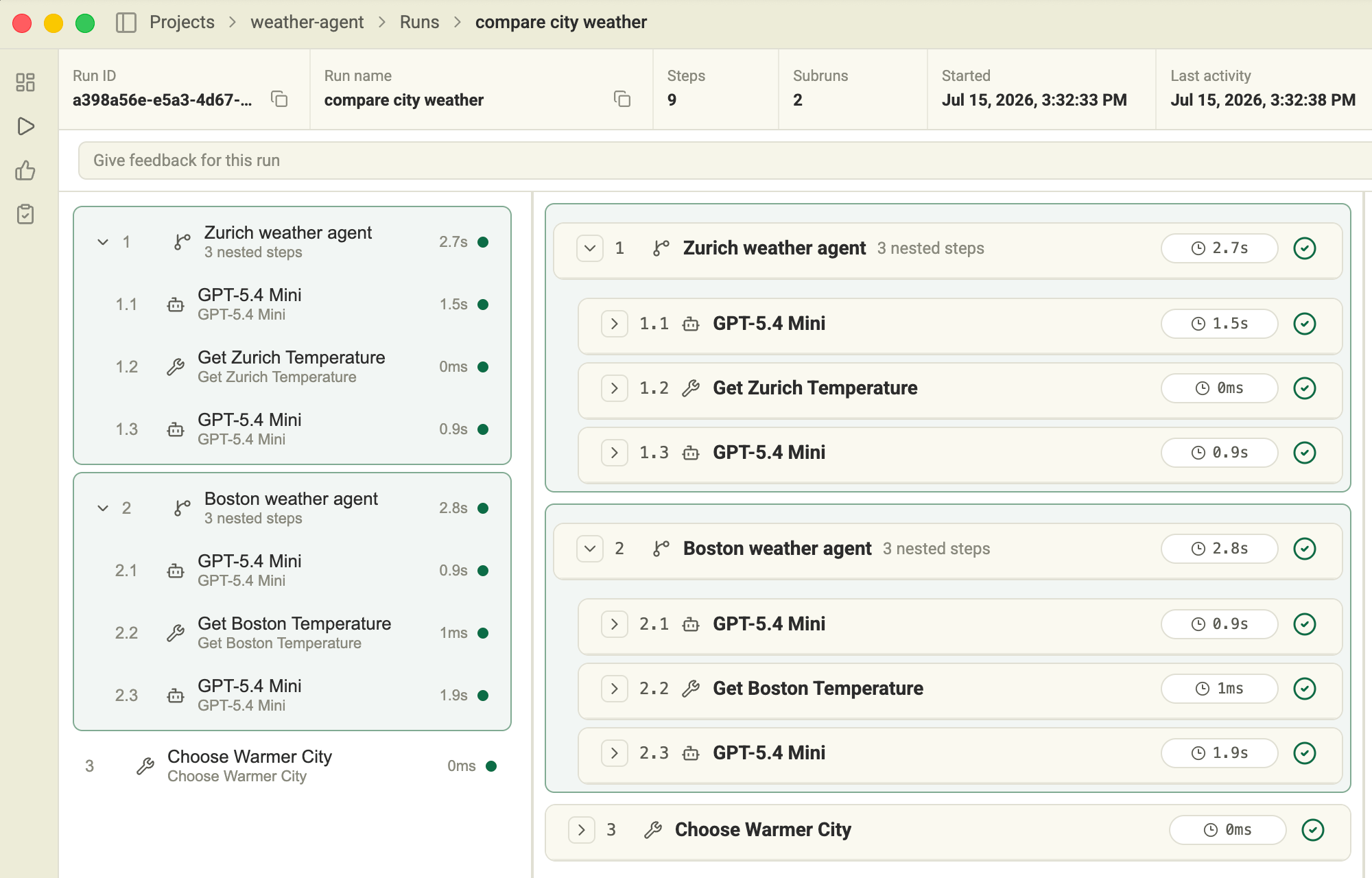
 Open the run to see both weather-agent subruns, their LLM and tool calls, and
the final `Choose Warmer City` step:
Open the run to see both weather-agent subruns, their LLM and tool calls, and
the final `Choose Warmer City` step:
 ## Next steps
* [Use the SDK](/sdks/python/use-the-sdk) for subruns, persistent run IDs, lessons, and metadata.
* [API reference](/sdks/python/api-reference) for the exact public surface.
* [Troubleshooting](/sdks/python/troubleshooting) for missing runs or steps.
## Next steps
* [Use the SDK](/sdks/python/use-the-sdk) for subruns, persistent run IDs, lessons, and metadata.
* [API reference](/sdks/python/api-reference) for the exact public surface.
* [Troubleshooting](/sdks/python/troubleshooting) for missing runs or steps.